The playground
Launch the playground to open a graph, run an example query, and see both its answer and the bytes needed to get it. The rete engine runs in your browser. Embedded datasets work offline; remote datasets and optional online resources still need a connection.
Choose a dataset
The picker groups datasets by theme and shows a description, licence and size. Choose one whose example questions interest you. Embedded opens bytes already in the page. Lazy reads a remote file as queries need it. Cache downloads the whole file into IndexedDB for later local use; remove it under Settings > Whole-file caches. A sharded dataset combines several files as one logical graph, with queries fanning out across its shards.
Before querying an unfamiliar graph, open Card beside the source. The Dataset Card can tell you its title, licence, provenance, counts, vocabulary and starter queries without reading the triple index. Use loads a card query into the editor; these also appear beside catalog examples. JSON lets you copy or download the card. The rendered view also shows any separate build record. Older files may lack these fields.
To open your own file, use + Add source > Connect (lazy) with a .rete URL.
Its host needs ranges and browser CORS; see Hosting.
Chromium uses concurrent reads by default. Firefox and Safari default to sequential reads because their engines can trap in the concurrent reader; large remote queries may therefore take longer. Settings can force concurrent reads, with that risk. Mobile memory limits can prevent very large graphs from opening. The optional local AI and semantic-search models need WebGPU.
Run a question you can interpret
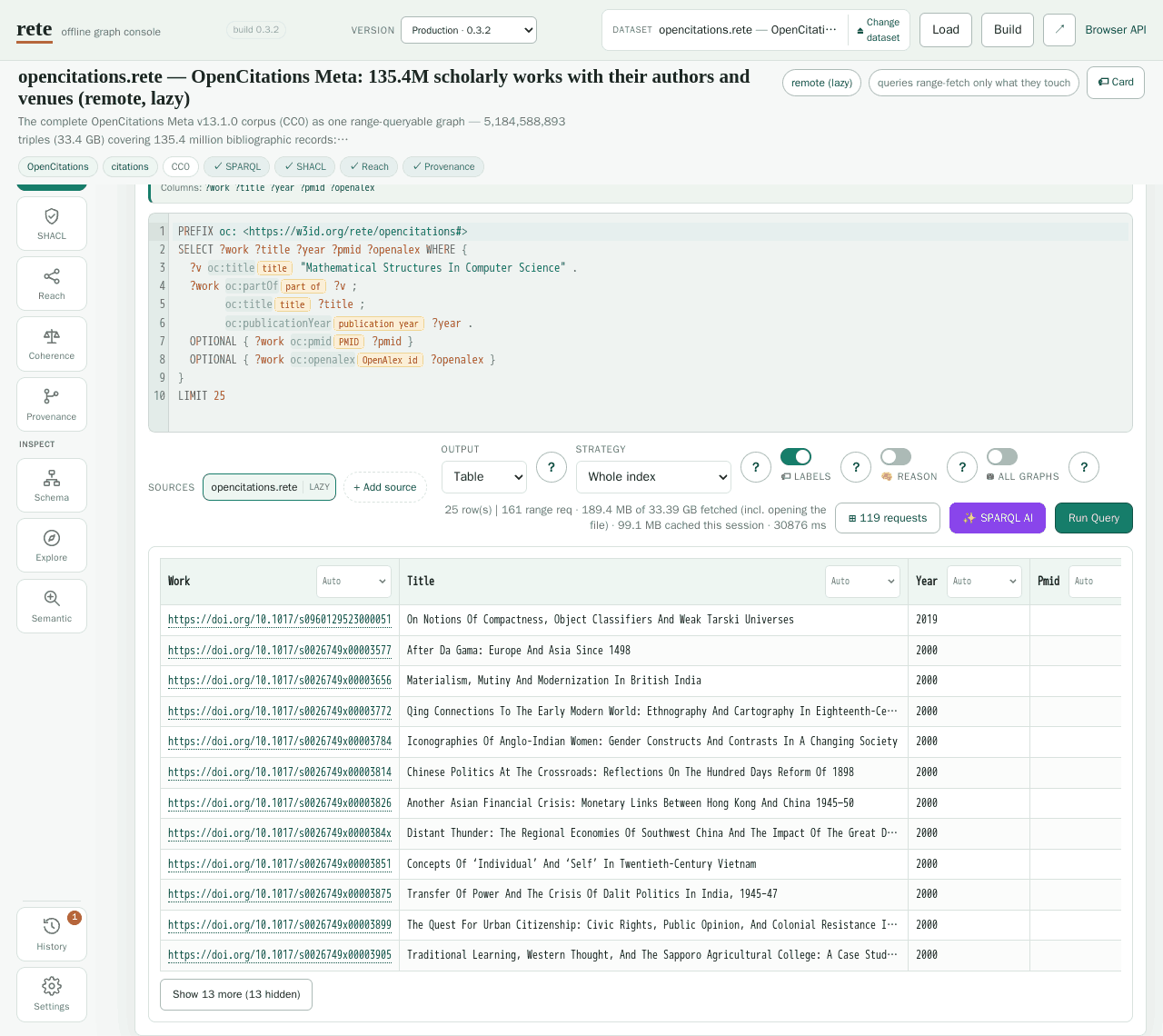
Click an example query, read its tip, then run it. Start with the default Whole index strategy so you are querying full data. The table columns correspond to the variables selected by the query. IRIs identify resources; labels help you read them, and media-aware cells can show pictures, documents, models or geometry.
Change one part of the query and run it again. Find a term browses classes and predicates, searches entities by label, and inserts an IRI at the cursor. A predicate's values > drill shows its distinct objects. Labels adds human-readable chips. SPARQL AI can draft a query locally on your GPU; check the draft and its results against the question you intended.
Two controls change the meaning of a query:
- Reason includes solutions entailed through supported OWL 2 QL query rewriting. See Reasoning.
- All graphs treats the default graph as the union of default and named graphs. It can help when all statements are in named graphs, but it is nonstandard and can add substantial reads. It does not apply to federated runs or live endpoints. See Union default graph.
Choose an Output that fits the selected columns:
| Output | Needs | Query shape |
|---|---|---|
| Table | anything | any SELECT, ASK, or CONSTRUCT |
| Cards | anything | the same rows as Table, but one card per row with the fields stacked — media renders full-width, so it reads well on a phone; on a wide screen the cards flow as a masonry. The ⚙ Fields button picks how each field renders (the same types as a table column's header dropdown). |
| Graph | edges to draw | a CONSTRUCT { ?a ?p ?b } …, or a SELECT with ≥ 2 variables — 2 vars are read as v1 → v2 ("related") edges; 3 vars are read as (subject, predicate, object). A 1-variable SELECT has nothing to connect. |
| Map | a WKT geometry column | a SELECT that binds a variable to a geo:wktLiteral (e.g. ?w via geo:hasGeometry/geo:asWKT ?w). POINT / LINESTRING / POLYGON / MULTI* all plot; the first non-geometry column becomes each feature's hover label. |
| Time | a year / date column | a SELECT that binds a variable to xsd:gYear, xsd:date / xsd:dateTime, or a plain year integer (e.g. ex:year ?y). The other selected column(s) become the items listed in each cell's tooltip. |
| TTL / JSON-LD | triples | a CONSTRUCT query — these serialise the constructed graph. A SELECT has no triples to serialise. |
Map and Time detect geometry and dates in the returned columns. Time buckets years to fit the span and recognizes negative years as BCE. The Map plot can work offline; a dataset with PMTiles can also offer Tiles. Use Whole index or Split by community for individual geometry and dates: Progressive uses summary data and returns approximate answers. See GeoSPARQL and Media & SQL companions for examples and media types.
Read the cost, then explore further
On a remote graph the result line reports
N range requests / M KB fetched / file is X MB.
These are bytes read, not a promise that every query reads a
small fraction. Open requests for the actual ranges. Run the query again:
0 new bytes means the session cache supplied its reads, even if query
computation still took time.
Settings > Persist fetched ranges across reloads keeps fetched blocks in IndexedDB; whole-file caches are separate. The optional isolated Parallel range reads worker pool reloads to enable isolation and disables CDN-loaded DuckDB/SQLite backends while active. The default Chromium concurrent reader does not require this setting.
The same source supports other ways to investigate it:
| Mode | What to do next |
|---|---|
| Schema | Browse classes and relations; see Semantic zoom. |
| Explore | Browse entity tables by class, or SQL companions where supplied; see Media & SQL companions. |
| Semantic | Search by meaning on files with embeddings, turn hits into a SPARQL VALUES block, or draft a grounded answer; see Ask the graph. |
| SHACL | Check shapes; see SHACL validation. |
| Reach | Follow one predicate transitively from seed entities; see CLI reachability. |
| Provenance | Inspect the physical dictionary, index and tile ranges behind a match; see Browser API. |
| Coherence | Run tiered checks, from schema scans to materialization; see Reasoning. |
Build turns pasted or uploaded N-Triples, N-Quads or Turtle into a file you
can query, save in the browser or download. In step 3, the catalog entry controls
how the playground lists the graph; the separate Dataset Card JSON travels
inside the file. Form fields patch that JSON. The same engine validation as
rete build --card-file checks it; unknown fields belong in extra, and themes
must be IRIs. See Dataset Cards for the full schema.
A browser build currently writes curated fields and measured counts, without the derived profile, starter-query library or build record. An empty card editor produces no card. Rebuild with the CLI for the full derived card and compressed sections. The WASM API offers derived-card building, but this UI does not call it. See Getting started and Hosting to publish.
+ Add source also lets you query several files together, including
cross-source joins for flat basic graph patterns. Nested query shapes have
limits; read Federation. A SPARQL endpoint
with live enabled becomes the query target and permits updates. Connected
to rete serve, this lets you edit the live graph and download a snapshot;
#endpoint=<url> opens an endpoint directly.
Share the answer and its settings
Press Share, or use an example chip's link button. Catalog examples and
datasets have preview pages under q/ and d/ that open the corresponding
playground view. Their cards show measured answers and costs; browse
Shareable queries. Edited queries and views with extra settings
use a playground deep link instead.
The URL fragment records the dataset, query or example, and relevant controls. Settings that change the answer must travel with it:
| Parameter | Control | Values | Effect |
|---|---|---|---|
union | ⛁ All graphs | 1 / 0 (default off) | answer — mounts the file as if the default graph were the union of the default graph and every named graph |
reason | 🧠 Reason | 1 / 0 (default off) | answer — OWL 2 QL entailment, so subclass/subproperty instances also match |
strategy | Strategy | whole (default) · progressive · community | answer — progressive answers from the pyramid summary and is approximate by contract |
round | Round | an integer | answer — which dendrogram round the community strategy answers from |
fed | SOURCES | comma-separated catalog keys, e.g. fed=nomisma,mimotext | answer — extra datasets the query also runs against |
view | Output | table (default) · cards · graph · map · tiles · time · ttl · jsonld | presentation — how the same rows are drawn |
labels | 🏷 Labels | 1 (default on) / 0 | presentation — the human-label chips beside IRIs in the editor |
The first five controls change query results; view and labels change their
presentation. The address bar updates as you change them.
An external file uses #url=<https://your-host.example/file.rete>&mode=sparql. Catalog sources
added for federation can travel as fed keys, but additional sources pasted
as URLs or endpoints are omitted. Share warns when it leaves one out, so
check that warning before sending a link. A link cannot supply a recipient
with browser-local built data or private access to a source.
For embedding the engine in your own page, see the Browser API. For source builds and playground generation, see Contributing.