Getting started
Getting the CLI
You do not need a Rust toolchain, a clone of the repo, or its dev container to
use rete. A prebuilt CLI image is published —
ghcr.io/caviri/rete-cli,
~30 MB on distroless, multi-arch (amd64 + arm64) — so turning an RDF dump into a
.rete is one command:
# run this in the directory that holds your dump
docker run --rm -v "$PWD:/data" ghcr.io/caviri/rete-cli:latest \
  build /data/dump.nt -o /data/out.rete --card --title "My graph"
embedded dataset card (16240 bytes of metadata)
wrote /data/out.rete: 5 triples, 8 terms, 1 pyramid level(s), 18061 bytes
-v "$PWD:/data" maps the current directory onto /data inside the container,
so /data/out.rete is ./out.rete on your machine — the file is next to
your dump when the command exits, with nothing to extract from a container.
The rest of this page writes commands as a bare rete …. Define this alias once
and they all run as written against the files in your current directory
(-w /data makes the container's working directory your directory, so plain
filenames resolve; -i lets you pipe into it):
alias rete='docker run --rm -i -v "$PWD:/data" -w /data ghcr.io/caviri/rete-cli:latest'
Three container gotchas, all of them silent. Piping needs
docker run -i— the alias sets it, but without-istdin is empty andrete build -writes a valid, 0-triple file and exits 0. On Linux the image runs as root, so add--user "$(id -u):$(id -g)"unless you want the output owned by root. On Windows Git Bash, MSYS rewrites both the mount and/data/…arguments (/data/dump.ntbecomesC:/Program Files/Git/data/dump.nt, and a$PWDmount resolves to a directory that is not yours — the build reports success and no file appears); useMSYS_NO_PATHCONV=1 docker run --rm -v "$(pwd -W):/data" ….
Other routes to the same engine, if a container is not what you want:
pip install rete-graph (Python),
npm install rete-graph (JavaScript), or a build from source
(below). Remote graphs need no install beyond the image and no mount at all —
see Deploying & querying over a URL further down.
Building from source
Building rete itself — as opposed to using it — happens entirely inside a
container; nothing runs on the host. The dev container
(.devcontainer/)
carries the Rust 1.92 toolchain, rustfmt, clippy, Python, the
wasm32-unknown-unknown target, and wasm-pack.
Open the folder in a dev container (VS Code: Reopen in Container), or run the same image directly:
docker build -t rete-dev -f .devcontainer/Dockerfile .
docker run --rm -it -v "${PWD}:/work" -w /work rete-dev bash
# then, inside:
cargo build --release -p rete-cli
The compiled CLI is at target/release/rete; put it on your PATH and the
examples below run without the alias (or substitute cargo run -p rete-cli --).
Building a .rete file
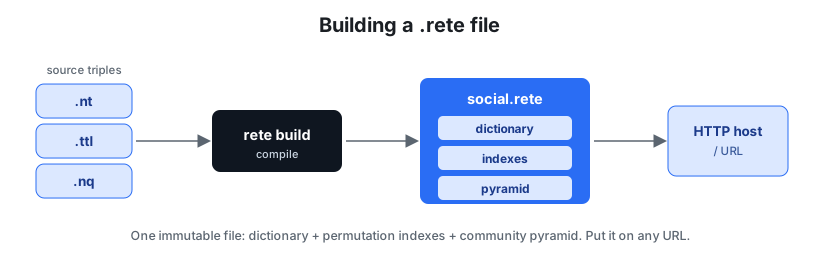
rete build packs your triples into one immutable file — dictionary, permutation indexes, and a community pyramid — that you can drop on any URL.rete build accepts N-Triples (.nt), N-Quads (.nq), Turtle (.ttl), and
RDF/XML (.rdf / .owl / .rdfxml — the usual OWL serialization), detected by
extension. Multiple inputs are merged under one shared dictionary, and - reads
standard input.
rete build data.nt -o data.rete                  # single file
rete build part1.nt part2.nt -o merged.rete      # merge several inputs
curl -s https://host/data.nt | rete build - -o data.rete   # from a pipe
rete build dump.unknown --format nt -o out.rete  # force a format
N-Quads inputs build a dataset: one shared dictionary, a default-graph index, and one index per named graph.
A full ontology: RDF/XML → an optimized .rete
Most OBO/W3C ontologies ship as RDF/XML (*.owl), which rete build reads
directly — no conversion step:
# assemble, with a self-describing Dataset Card (title/license/source/examples)
rete build chebi.owl -o chebi.rete --card \
  --title "ChEBI (full)" --license "CC BY 4.0" --source "https://www.ebi.ac.uk/chebi/"
#   812 MB owl -> 8.83 M triples, 3.15 M terms, 6 pyramid levels, 120 MB
(The two non-RDF OWL serializations — OWL/XML and Functional Syntax — do need an external convert-to-RDF step first; see Compatibility & Cypher.)
The build is parallel and allocation-frugal by design (the CLI enables the
parallel feature): the dictionary dedups terms with a HashSet and sorts once,
and the permutation indexes (six by default: SPO/POS/OSP/SOP/PSO/OPS, or three
with build --permutations 3)
are built concurrently with parallel sorts. This is what lets it scale to millions of unique terms
(definitions, synonyms, SMILES/InChI strings) without the build collapsing into
allocation churn — and the output is byte-identical to a serial build, so the
speedup is free. Turtle-native sources (e.g. a 239 MB .ttl) skip rapper and
feed rete build --format ttl directly.
The result is a single range-queryable file: drop it on any HTTP host and query it lazily (below — see Hosting your .rete for host recipes), or register it in the playground as a remote dataset. To go alongside it with a columnar/SQL view, generate lossless entity tables straight from the same N-Triples.
Querying locally
# Triple pattern — any of subject/predicate/object may be omitted (a wildcard):
rete query data.rete --predicate '<http://ex/knows>'
rete query data.rete --object   '<http://ex/Alice>'

# Basic Graph Pattern (multi-pattern join); ?x is a variable, ' . ' separates:
rete bgp data.rete "?x <http://ex/knows> ?y . ?y <http://ex/knows> ?z"

# Full SPARQL (SELECT / ASK / CONSTRUCT / DESCRIBE):
rete sparql data.rete "PREFIX e: <http://ex/> SELECT ?x ?z WHERE { ?x e:knows ?y . ?y e:knows ?z }"

# Standard SPARQL Results JSON, for piping into other tools:
rete sparql data.rete "SELECT ?s ?p ?o WHERE { ?s ?p ?o } LIMIT 10" --json
See the SPARQL support page for the full feature list.
Validating shapes
Use rete shacl when you need semantic data-quality checks, not just syntax or
file integrity. Shapes are Turtle files; the command exits non-zero if the graph
does not conform.
rete shacl data.rete --shapes shapes.ttl
rete shacl data.rete --shapes shapes.ttl --format json
See SHACL validation for the supported SHACL Core surface.
Inspecting a file
rete info   data.rete          # raw header
rete stats  data.rete          # size, counts, top predicates, planner stats, entity shapes
rete verify data.rete          # check the blake3 content hash (detect corruption)
rete graphs data.rete          # list named-graph IRIs
rete search data.rete gluc     # prefix-search labels (autocomplete; no literal scan)
rete export data.rete          # dump back to N-Quads (lossless)
Two coarse-graph views answer questions without reading the triple index:
rete summary data.rete   # structural: Louvain community quotient graph
rete schema  data.rete   # semantic: relations between rdf:type classes
rete predicates data.rete  # exact per-predicate totals, from the summary alone
rete stats also prints two index-free profiles read from the pyramid: the
planner stats (per predicate: distinct subjects/objects, multiplicities, and
functional / inverse-functional hints — the cardinality the cost-based join
planner uses) and the entity shapes (the most common characteristic sets —
which predicate-combinations subjects carry, e.g. {type, name, age} ×N).
Label search (autocomplete)
rete search data.rete <prefix> resolves a case-insensitive label prefix
without scanning the literals. At build time rete extracts the display labels
(rdfs:label, skos:prefLabel/altLabel, foaf:name, dc(terms):title,
schema:name) of the most-connected subjects into a bounded, label-sorted block
in the pyramid-meta; a prefix query is then a binary search over that block:
rete search data.rete "alan"          # label<TAB><iri> rows, case-insensitive
rete search data.rete "alan" --limit 5 --json   # [{"label":…,"subject":…}]
rete search data.rete                 # empty prefix → the first --limit labels
This is the fast path for autocomplete: a binary search plus a short walk,
versus a FILTER(STRSTARTS(LCASE(?l), …)) scan over every label triple
(measured ~22× faster at 6k labeled subjects; the gap widens with size — the
scan is linear in the label count, the index is O(log n + matches)). The block
is bounded (top 8,192 labeled subjects by degree), so on a very large graph
it covers the prominent entities; an exhaustive match still needs the FILTER
scan. Files built before this feature have no label index — rebuild to add it
(the block is additive and backward-compatible, so old readers ignore it).
Full-text search (word / CONTAINS)
Label prefix search finds an entity by the start of its label. To find entities
by a word anywhere in any of their literals, build with --text-index and
query with rete search --contains:
rete build data.nt -o data.rete --text-index   # opt-in TEXT_INDEX section

rete search data.rete --contains glucose            # subjects whose literals say "glucose"
rete search data.rete --contains glucose phosphate  # AND — both words (any literal)
rete search data.rete --contains-prefix einst       # word starting with "einst…"
rete search data.rete --contains glucose --json     # [{"subject":…}]
Matching is whole-word and case-insensitive (the same tokenizer builds and
queries: Unicode-alphanumeric runs, lowercased, length ≥ 2). The index maps each
word to its sorted subject ids as its own range-readable section (§6.3 of the
SPEC): the token table is read once, then each queried word faults only
its posting list — so a --contains over a remote multi-GB file fetches
kilobytes, not the whole index. It is opt-in because it is sizable; a build
without --text-index is byte-identical to one built before the feature, and
rete search --contains on such a file reports that there is no text index.
rete stats shows the section's size when present.
Deploying & querying over a URL
A .rete file is immutable and self-describing, so any static host that honors
HTTP Range requests works — S3, GCS, GitHub, a CDN, or the bundled dev server:
# Local range-capable server for testing:
python3 scripts/range_server.py 8000 .
rete query-url http://127.0.0.1:8000/data.rete --object '<http://ex/Dave>'

# Real https hosts (rustls; no http-only limitation):
rete query-url   https://my-bucket.s3.amazonaws.com/data.rete --predicate '<http://ex/knows>'
rete summary-url https://raw.githubusercontent.com/me/repo/main/data.rete
query-url resolves bound terms from the dictionary, then fetches only the
selected permutation payload (the best of the six) for the triple pattern. summary-url
reads just the header, dictionary, and summary — the index is never
downloaded. The host must return 206 Partial Content to a Range
request; a host that ignores Range (returns 200) is rejected with a clear
error rather than silently returning wrong bytes.
Generating synthetic test data
scripts/synth_graph.py generates a realistic scholarly knowledge graph —
papers, authors, venues, institutions, grants, fields — with the statistics
real graphs have (power-law citations via preferential attachment, field
communities, Zipfian venue popularity, log-normal team sizes, typed literals,
per-year temporal structure). Two orthogonal knobs control it on demand:
# 10k papers (~315k triples), clean:
uv run python scripts/synth_graph.py --papers 10000 -o clean.nt

# Same size, 20% deliberate mess (cross-field rewires, temporal violations,
# missing attributes, mangled literals) — for robustness/quality testing:
uv run python scripts/synth_graph.py --papers 10000 --noise 0.2 --seed 7 -o messy.nt

# N-Quads with one named graph per publication year:
uv run python scripts/synth_graph.py --papers 5000 --quads -o by-year.nq

rete build clean.nt -o clean.rete
Identical arguments + seed reproduce the byte-identical graph; different seeds
give natural variability at the same size/noise point. A per-kind breakdown of
every noise event goes to stderr, so a test knows exactly what mess it got.
(scripts/gen_graph.py is the older, simpler social-graph generator used by
scripts/bench.sh.)
Scaling to ~1 GB
The generator and rete build scale linearly, so a big stress-test graph is
just a bigger --papers. Output is roughly 85 bytes/triple as N-Triples
and 31 triples/paper, so ~1 GB is about 400k papers / 12.5M triples:
uv run python scripts/synth_graph.py --papers 400000 --seed 1 -o big.nt  # ~1.1 GB, ~22 s
rete build big.nt -o big.rete                                            # ~56 s -> ~100 MB
Measured on the dev container (12.5M triples, 2.0M terms, ~30k communities):
build is ~56 s and the .rete is ~100 MB (zstd). The point of the size is what
querying it then doesn't read: a selective pattern answers in under a second,
rete predicates reads ~20 MB of summary rather than the 80 MB index, and a
lazy query open (rete cost big.rete "<query>") touches ~7 MB in ~50 range
requests instead of the whole file — the range-query promise, at 1 GB.
The playground's scholar / scholar-noisy demo datasets are built with this
generator (250 papers, seed 42, noise 0 and 0.25 — the exact commands are in
the scripts/build_playground.py docstring).
Going further
That's the whole loop: build a file, query it, put it on a URL. Where next:
- Hosting your .rete — R2, Zenodo, GitHub Pages, S3: what a host must support and how to check it.
- The playground — explore your file (or 40+ published datasets) in the browser.
- Tables, VKG & big builds — lossless entity/property tables next to the graph, the virtual-knowledge-graph comparison, and recipes for pulling real Wikidata at gigabyte scale.
Testing
cargo test            # full suite (unit, round-trip, robustness, ranged, HTTP)
cargo clippy --workspace --all-targets -- -D warnings
bash scripts/smoke.sh # end-to-end acceptance test of every CLI subcommand
CI runs all of this — plus the feature matrix and the wasm build — in containers, so nothing ever builds on the host.