Topic modeling over communities (LDA)
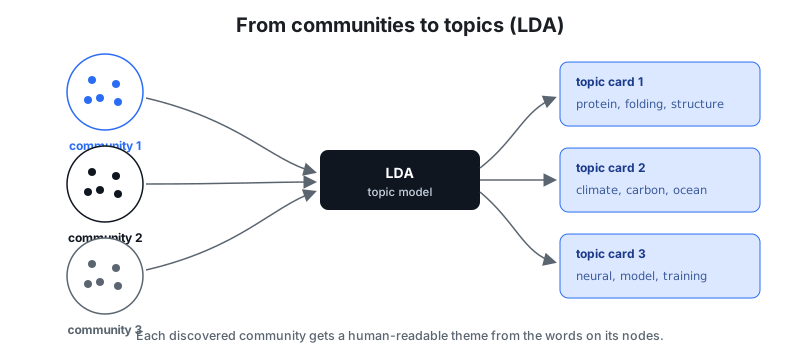
A graph has two complementary notions of "cluster":
- Communities — structural groups found from the link topology. Densely
connected nodes (here: papers that cite each other) fall into the same Louvain
community. This is what
retecomputes for its pyramid summary (seerete summaryand the pyramid idea). - Topics — latent themes in the text attached to those nodes (titles, abstracts, labels). "Machine learning", "databases", "biology" are topics, not links.
They often line up — a citation cluster usually shares a theme — but nothing
guarantees it. This tutorial uses rete to get (a) the community partition
and (b) each community's text in one shot, then runs
Latent Dirichlet Allocation (LDA)
to label each community with its dominant theme.
retesupplies the two hard parts: the partition (Louvain) and the per-community text extraction. LDA is a standard downstream step —reteis a graph file format, not an ML engine.
The example graph, examples/papers.nt,
is 9 "papers" in 3 citation clusters (ML, databases, biology). Citations are
dense within a cluster and sparse across, so Louvain recovers the 3 groups;
each paper carries a title and an abstract literal with cluster-specific
vocabulary.
Quick path: structural profiles (no ML)
Before reaching for LDA, rete communities --profile gives each community a
no-ML "topic" label straight from the graph: its most frequent literal words,
rdf:type classes, and predicates. No Python, no dependencies.
rete build examples/papers.nt -o papers.rete
rete communities papers.rete --profile
community 0: 3 members, 6 literals
    topic words : network (6), neural (5), deep (3), gradient (3), learning (3) …
    classes     : <http://ex/Paper> (3)
    predicates  : <http://ex/cites> (6), <http://ex/abstract> (3), <http://ex/title> (3) …
community 1: 3 members, 6 literals
    topic words : query (5), database (4), storage (4), transactional (4) …
community 2: 3 members, 6 literals
    topic words : gene (5), protein (5), cell (4), dna (4), genome (4) …
That already separates ML / databases / biology cleanly — word frequency over a
community's text is a strong baseline. Reach for LDA below when you want latent
topics (themes that span words and are shared across communities) rather than
just the top terms. --json --profile adds a "profile": { types, predicates, terms } object to each community for programmatic use.
Step 1 — build the file
rete build examples/papers.nt -o papers.rete
Peek at the structure (no index read needed):
rete summary papers.rete
pyramid round 0 — 3 communities summarized as 12 superedge(s):
  C0 (internal) C0  via <http://ex/cites>  x6
  C1 (internal) C1  via <http://ex/cites>  x6
  C2 (internal) C2  via <http://ex/cites>  x6
  ...
Three communities, each internally dense on cites — exactly the citation
clusters.
Step 2 — extract per-community membership + text
rete communities papers.rete --json > communities.json
The versioned envelope contains one record per community: its members (subject
IRIs) and text (the lexical values of all literal objects — the topic corpus):
{
  "schemaVersion": 1,
  "communities": [
    {
    "community": 0,
    "size": 3,
    "members": ["<http://ex/p1>", "<http://ex/p2>", "<http://ex/p3>"],
    "text": [
      "We train a deep neural network model on labeled images...",
      "Deep neural networks for image classification",
      "A reinforcement learning agent learns a policy by maximizing reward...",
      ...
    ]
    },
    ...
  ]
}
--round N cuts the dendrogram at a specific round (default: the round chosen
for the tile budget); --min-size N drops tiny communities. Without --json
you get a human summary (members + literal counts).
Step 3 — run LDA
scripts/lda_topics.py
treats each community as one document (its text joined), builds a
document-term matrix (English stopwords), fits LDA, and prints the top words per
topic plus each community's dominant topic.
pip install scikit-learn
rete communities papers.rete --json | python3 scripts/lda_topics.py --topics 3
== 3 topic(s) over 3 community document(s) ==
  topic 0: network, neural, improves, query, model, transactional, database, storage
  topic 1: using, study, model, tree, transaction, strategies, structures, load
  topic 2: protein, gene, genome, molecular, dna, cell, tissue, mutations

== community → dominant topic ==
  community 0: topic 0  [network, neural, improves]  (p=0.99)
  community 1: topic 0  [network, neural, improves]  (p=0.99)
  community 2: topic 2  [protein, gene, genome]  (p=0.99)
Community 2 is cleanly the biology cluster (gene, genome, dna, protein).
The script reads from stdin or a file (lda_topics.py communities.json), and
--topics / --top-words are tunable.
Step 4 (optional) — write topics back as queryable RDF
Once you have a label per community, you can attach it to each member and rebuild so the topic becomes queryable with SPARQL:
# e.g. community 2 → "biology"
cat >> topics.nt <<'EOF'
<http://ex/p7> <http://ex/topic> "biology" .
<http://ex/p8> <http://ex/topic> "biology" .
<http://ex/p9> <http://ex/topic> "biology" .
EOF

rete build examples/papers.nt topics.nt -o papers-topics.rete

rete sparql papers-topics.rete \
  'PREFIX e: <http://ex/> SELECT ?p WHERE { ?p e:topic "biology" }'
The topic is now a first-class edge: filter, join, and traverse it like any other relation.
Honest notes
- LDA needs real text and volume. This 9-paper demo is illustrative: with only 3 documents LDA cannot reliably split the two technical clusters (ML vs. databases often land on one topic), though the lexically distinct biology cluster separates perfectly. On a real corpus (hundreds of documents per community, longer abstracts) topics become sharp.
- Communities ≠ topics. They coincide here by construction; on real data compare them — a structural community spanning two topics is itself a finding.
- LDA is non-deterministic up to its random seed (the script fixes
random_state=0for reproducibility) and the topic count is a hyperparameter you choose.
See also: Graph data 101, CLI reference, Compatibility & interop.